System Workflow
System Workflow
The System Workflow functionality enables a user to set the different workflows for various actions
within the system including the initiator or creator of a process, verifiers, approvers and authorizers.
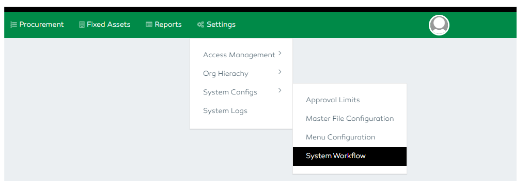
To access the functionality,
- Click the
System Configs - Select the
System Workflowfeature - Click the
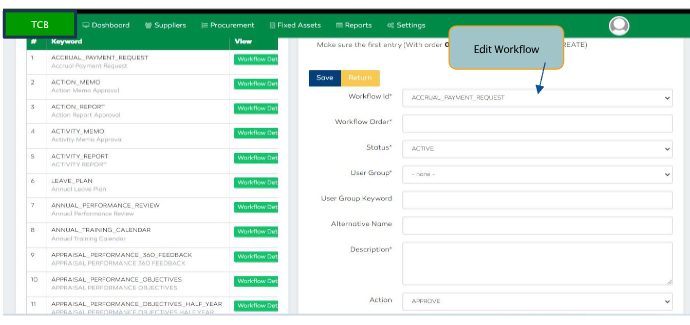
Workflow Detailsbutton found within theViewcolumn. - A user is capable of adding a workflow by selecting the “Add” button.
- A user has to enter the workflow order, status (active or inactive), user group, user group keyword, alternative name, description and the action (create, approve, check, authorize, verify)
- Select the “Save” button to submit or
Returnbutton to discard. - A user can also edit or delete a workflow by selecting the
EditandDeletefunctionalities found in the last column.
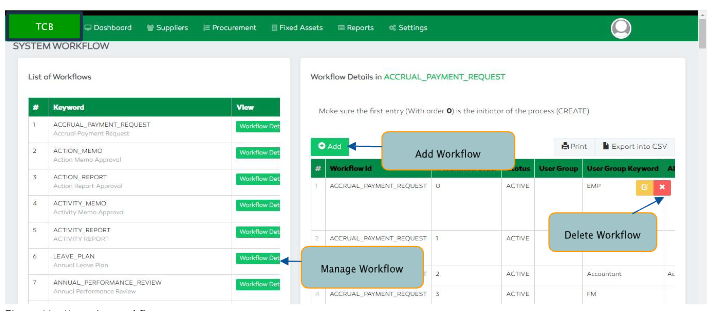
Adding new workflow